 Pencil2D
Today, we are thrilled to announce the official release of pencil2d-mcp v0.3.0, live on PyPI and open-sourced on GitHub.
The Model Context Protocol (MCP) is rapidly becoming the universal standard for how artificial intelligence models interface with external applications, databases, and local file systems. Until now, traditional 2D hand-drawn animation lacked a lightweight, standardized MCP integration. pencil2d-mcp bridges that gap.
What's New in v0.3.0: Pure-Python Rendering & Headless Autodetection
With the v0.3.0 release, pencil2d-mcp introduces a built-in pure-Python Pillow fallback compositor. Animations can now be composited and exported directly to animated GIF, PNG sequences, and MP4 even on machines where the Pencil2D binary is not installed, or inside headless containers without an X server. In addition, the AppImage CLI runner now auto-detects headless environments using xvfb-run, runs GUI processes in detached background sessions, and adds ergonomic API shortcuts (Pencil2DProject.create(...), validate(), and render_animation).
Why Pencil2D?
Pencil2D is a beloved, open-source 2D animation suite. It uses clean, standard project structures without proprietary binary lock-in:
.pclxfiles are standard ZIP archives.- The project timeline, layers, frame mapping, and camera parameters are coordinated by
main.xmlwith a strict<!DOCTYPE PencilDocument>specification. - Individual bitmap keyframes are stored as lossless PNG files (
001.001.png), vector strokes as XML curves (.vec), and palettes as clean XML nodes (palette.xml). - The Pencil2D AppImage contains a bundled, high-performance software rasterizer and an internal FFmpeg plugin that can be run completely headlessly from the command line.
What's New in v0.2.0: 14 First-Class Tools
While v0.1.0 introduced baseline project generation and rendering, v0.2.0 expands the toolset to 14 specialized MCP tools designed to handle industrial animation pipelines:
1. High-Throughput Batch Keyframing
Calling an MCP tool for every single frame introduces round-trip network and token overhead. With pencil2d_add_frames_batch, an agent can ingest an entire directory of PNG drawings or a structured list of keyframes in a single JSON-RPC execution.
2. Dynamic Multi-Layer Organization
Professional animators never flatten an entire character into a single layer. With pencil2d_add_layer and pencil2d_remove_layer, agents can partition artwork into Bitmap, Vector, Sound, and Camera layers, preserving clean separation between facial expressions, line art, clothing hatching, and backgrounds.
3. Audio Synchronization
Using pencil2d_add_audio, AI agents can embed dialogue clips, foley, and soundtrack tracks (.wav, .mp3) directly into sound layers aligned with specific keyframe timestamps.
4. Multi-Frame Camera Moves
With pencil2d_set_camera, animators can keyframe smooth viewport zooms, cinematic pans (dx, dy), and rotation angles across the timeline.
5. Game Dev Spritesheet Generation
pencil2d_create_spritesheet packs project frames into a single, uniform spritesheet image with coordinate grid metadata—ready for Unity, Godot, or web canvas games.
Case Study: The "My First Crush" Prototype
To put pencil2d-mcp to the test, we challenged an autonomous AI agent with designing and animating a complete character prototype: MC_NARRATOR_01, a seventh-standard schoolboy from the animation project My First Crush.
Within minutes, the AI used our MCP tools to:
- Initialize a 4-layer Pencil2D project (
Face & Expressions,Head & Hair,Body & Limbs, andCamera Layer). - Generate complete model turnaround sheets (Front, 3/4, Side).
- Produce 6 distinct emotional expressions (Neutral, Happy, Surprised, Shy, Embarrassed, Sad).
- Construct an 8-second, 96-frame animation prototype consisting of 4 distinct emotional sequences: Idle breathing and blink (2s), Look around (2s), Shy reaction (2s), and Friendly hand wave (2s).
- Headlessly render the final result to high-definition H.264 MP4 and an optimized animated GIF loop.
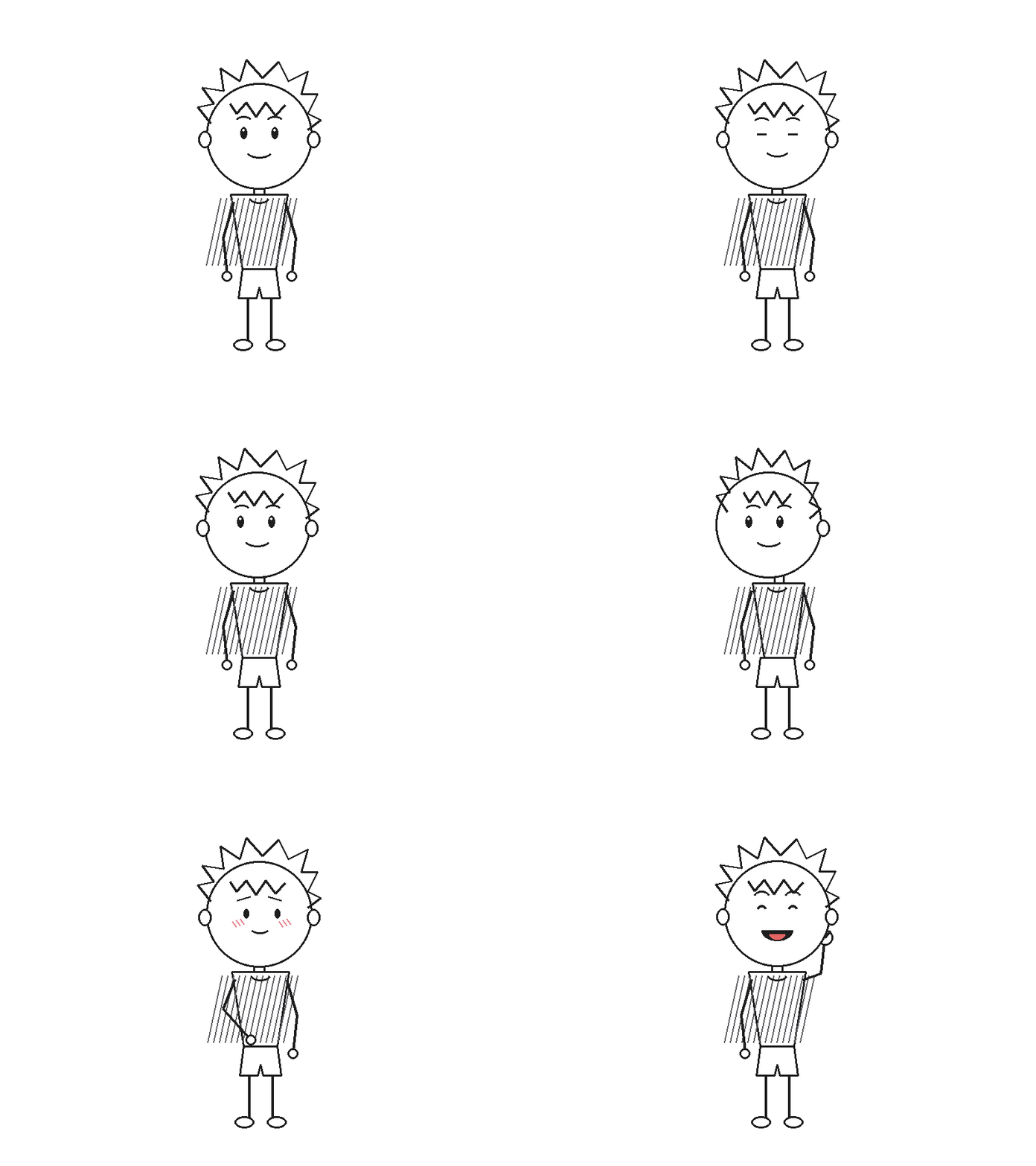
Actual 8-second 12 FPS prototype rendered headlessly by Pencil2D via MCP.
Get Started Today
Installing the server takes one command:
pip install pencil2d-mcpRead the Client Setup Guide to configure it in Claude Desktop, Google Antigravity, or Cursor, and start animating with your AI pair programmer today!
Note: This is my first time building an MCP server as a 20-year-old solo developer! If you face any issues, bugs, or have suggestions, please contact chrizmonsaji@proton.me or open an issue on GitHub.